
TUNEFM POUR IPOD NANO #F8Z061EA - IPod audio accessories BELKIN - Free user manual and instructions
Find the device manual for free TUNEFM POUR IPOD NANO #F8Z061EA BELKIN in PDF.


| Product Type | FM Transmitter for iPod nano |
| Brand | BELKIN |
| Model | TuneFM for iPod Nano #F8Z061EA |
| Compatibility | iPod nano (1st generation) |
| Power Supply | 12 V DC via cigarette lighter (cable included) |
| iPod Charging | Yes, via cigarette lighter or USB port (charge only) |
| Transmission Frequency | FM Band (88-108 MHz) |
| Memory Presets | 4 stations (buttons 1-4) |
| Audio Modes | Stereo and Mono (switchable) |
| Frequency Display | On iPod nano screen |
| Power On | Automatic when iPod is connected |
| Auto Power Off | Yes, when iPod is removed |
| Controls | Buttons ▲, ▼, 1, 2, 3, 4, combinations (1+3) |
| Dimensions (approx.) | 5.0 × 3.5 × 1.5 cm |
| Weight (approx.) | 30 g |
| Care | Clean with a soft, dry cloth |
| Safety | Do not insert any object other than the adapter into the cigarette lighter; unplug if not in use |
| Spare Parts | Not available separately |
| Repairability | Not user-serviceable; contact Belkin customer support |
| Warranty | 3 years |
| Authorized Countries of Use | Germany, Switzerland, Iceland (others: check local regulations) |
| Standards | EN 301 357, EN 301-489-9, CEPT REC 70-03 Class 2 |
Frequently Asked Questions - TUNEFM POUR IPOD NANO #F8Z061EA BELKIN
User questions about TUNEFM POUR IPOD NANO #F8Z061EA BELKIN
0 question about this device. Answer the ones you know or ask your own.
Ask a new question about this device
Download the instructions for your IPod audio accessories in PDF format for free! Find your manual TUNEFM POUR IPOD NANO #F8Z061EA - BELKIN and take your electronic device back in hand. On this page are published all the documents necessary for the use of your device. TUNEFM POUR IPOD NANO #F8Z061EA by BELKIN.
USER MANUAL TUNEFM POUR IPOD NANO #F8Z061EA BELKIN
Congratulations and thank you for purchasing the innovative TuneFM from Belkin. This product is designed to play your iPod nano through your car, home, or portable stereo. Please review this User Manual carefully so that you can be sure to get the most from your iPod nano, virtually anywhere you go.
- Turn down your car stereo's volume.
- Connect the Belkin TuneFM to your iPod nano (at the bottom of the nano).
- Connect the included Auto Power Cord to your cigarette-lighter outlet in your car and to the bottom of your TuneFM for optional powering and charging in the car.
The TuneFM transmitter function automatically turns on when the iPod is connected. It automatically turns off when the iPod is removed.
- Tune your stereo frequency to a channel with a weak broadcast signal. The ideal channel is one that is not broadcasting a radio program, or is doing so weakly.
- Insert the TuneFM into your iPod nano. The iPod backlight will turn on and the current transmitter frequency will be displayed on the iPod screen.
- Press the or button on the TuneFM to select the transmission frequency chosen in step 1. The frequency will be visible on the iPod nano's screen. Pressing and holding either button will provide faster tuning.
- After displaying the current frequency for five seconds, the iPod screen will return to the iPod Main Menu. This happens whenever you make changes to the TuneFM's settings. All settings—including transmission frequency and stereo/mono control settings—are permanently stored in memory at this time.
Note: iPod playback will pause momentarily when entering and exiting the TuneFM control menu. Playback will quickly resume.
- Adjust the iPod nano volume to about three-fourths of the maximum. Adjust the volume of your FM radio to the desired listening level.
NOTE: We recommend that you remove the TuneFM from the iPod when not in use.
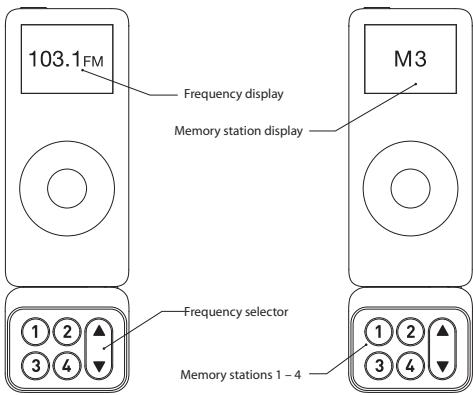
- To store a preset, select the desired frequency using or buttons. Press and hold the desired preset button (1, 2, 3, or 4) for two seconds. An audible beep sounds in the transmitted audio when the new frequency is programmed*. The iPod nano display reflects the change when the memory button is released by showing which memory button was pressed followed by the frequency saved in that memory position.
- Do NOT remove the TuneFM from the iPod nano until it returns to the Main Menu screen or new settings may not be saved.
- To transmit over one of your preset frequencies, momentarily press "1", "2", "3", or "4". This will instantly tune the FM transmitter to the frequency stored in that preset.
Transmitting music in stereo generally gives you the highest-quality listening experience. However, you may get better FM signal reception by changing the transmission to mono. The TuneFM transmits in stereo mode by default. We suggest that you switch from stereo to mono transmission only if your car stereo is NOT receiving a clear signal from the TuneFM, or if you are listening to mono recordings such as audio books.
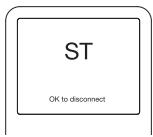
You can access the stereo/mono transmission menu by pressing the "1" and "3" buttons simultaneously for two seconds. The TuneFM then displays the current mode setting, which is represented by "MONO" or "ST".
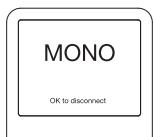
You can change the mode by pressing the up or down arrows. Either arrow will change between the two modes. The new setting takes effect immediately.
To accept your mode selection, press one of the memory preset buttons, or simply wait for the iPod screen to return to the iPod Main Menu.
Issue - The audio is distorted.
Solution 1
Decrease the volume of your iPod nano until you no longer hear distortion. Keeping the iPod nano volume level at or below three-fourths of the maximum should prevent audio distortion.
Solution 2
Tune your car stereo and the TuneFM to a different frequency.
Issue - I am unable to get clear FM reception.
Solution 1
Tune your car stereo and the TuneFM to a different frequency.
Solution 2
In some instances, lowering the car antenna (available in some cars) improves the clarity of the TuneFM's signal.
Solution 3
Change the stereo/mono setting to mono mode. This may improve signal reception, but the audio will be monaural instead of stereo.
Solution 4
If used indoors, attach or reposition the antennae on the stereo receiver.
Issue - iPod playback stays paused after I've changed a setting on the TuneFM.
Solution
Simply press the "Play/Pause" button on your iPod nano to resume playback.
Issue - The TuneFM does not appear to be saving my settings.
Solution
Be sure NOT to remove the iPod from the cradle or remove power to the TuneFM while adjusting the TuneFM settings. Your settings are stored in memory when the iPod screen returns to the iPod Main Menu.
Issue - When I attach a USB cable from my computer to the TuneFM, my computer does not recognize that the iPod nano is attached.
Solution
The USB connector on the TuneFM can only be used to charge the iPod.
Issue - My iPod nano does not seem to be charging.
Solution 1
Make sure that the TuneFM is correctly connected to your car's power outlet with the included Auto Power Cord.
Solution 2
Ensure that your car's power outlet is receiving power. Some cars are designed so that power is not provided to the power outlet unless the car is in ignition mode or the engine is started. If none of these solutions solves the problem, the fuse in the Auto Power Cord might be burned out and need to be replaced.
DO NOT INSERT ANY OBJECTS OTHER THAN THE CIGARETTE-LIGHTER ADAPTER INTO THE POWER OUTLET OF THE CAR WITHOUT DISCONNECTING THE BATTERY OF THE CAR FIRST. FAILURE TO OBSERVE THIS SAFETY WARNING CAN RESULT IN POSSIBLE INJURY OR PROPERTY DAMAGE.
Belkin does not assume any responsibility for personal injury or property damage incurred due to hazardous driving as a result of interaction with the TuneFM, the iPod, or the power outlet of the car.
This equipment has been tested and found to be compliant with the requirements of the R&TE Directive. These limits are designed to provide reasonable protection against harmful interference in a residential installation. This equipment generates, uses, and can radiate radio frequency energy and, if not installed and used in accordance with the instructions, may cause harmful interference to radio communications. However, there is no guarantee that interference will not occur in a particular installation. If this equipment does cause harmful interference to radio or television reception, which can be determined by turning the equipment off and on, the user is encouraged to try to correct the interference by one of the following measures:
Reorient or relocate the receiving antenna.
- Increase the separation between the equipment and receiver.
- Connect the equipment into an outlet on a circuit different from that to which the receiver is connected.
- Consult the dealer or an experienced radio/TV technician for help.
TuneFM is Compliant with and conforms to EN 301 357, EN 301 489-9 and
CEPT REC 70-03 Annex 13 as a
Class 2 device C0673
At 3 March 2006 this device may be used in: Germany, Switzerland and Iceland please see national legislation or Recommendation 70-03 implementation table for current position http://www.ero.dk/
What this warranty covers.
Belkin Corporation warrants to the original purchaser of this Belkin product that the product shall be free of defects in design, assembly, material, or workmanship.
What the period of coverage is.
Belkin Corporation warrants the Belkin product for three years.
What will we do to correct problems?
Product Warranty.
Belkin will repair or replace, at its option, any defective product free of charge (except for shipping charges for the product).
What is not covered by this warranty?
All above warranties are null and void if the Belkin product is not provided to Belkin Corporation for inspection upon Belkin's request at the sole expense of the purchaser, or if Belkin Corporation determines that the Belkin product has been improperly installed, altered in any way, or tampered with. The Belkin Product Warranty does not protect against acts of God (other than lightning) such as flood, earthquake, war, vandalism, theft, normal-use wear and tear, erosion, depletion, obsolescence, abuse, damage due to low voltage disturbances (i.e. brownouts or sags), non-authorized program, or system equipment modification or alteration.
How to get service.
To get service for your Belkin product you must take the following steps:
- Contact Belkin Ltd., Express Business Park, Shipton Way, Rushden, NN10 6GL, United Kingdom. Or call Belkin Tech Support Europe: 00 800 223 55 460, within 15 days of the Occurrence. Be prepared to provide the following information:
a. The part number of the Belkin product.
b. Where you purchased the product.
c. When you purchased the product.
d. Copy of original receipt.
- Your Belkin Customer Service Representative will then instruct you on how to forward your receipt and Belkin product and how to proceed with your claim. Belkin Corporation reserves the right to review the damaged Belkin product. All costs of shipping the Belkin product to Belkin Corporation for inspection shall be borne solely by the purchaser. If Belkin determines, in its sole discretion, that it is impractical to ship the damaged equipment to Belkin Corporation, Belkin may designate, in its sole discretion, an equipment repair facility to inspect and estimate the cost to repair such equipment. The cost, if any, of shipping the equipment to and from such repair facility and of such estimate shall be borne solely by the purchaser. Damaged equipment must remain available for inspection until the claim is finalized. Whenever claims are settled, Belkin Corporation reserves the right to be subrogated under any existing insurance policies the purchaser may have.
IN NO EVENT SHALL BELKIN CORPORATION BE LIABLE FOR INCIDENTAL, SPECIAL, DIRECT, INDIRECT, CONSEQUENTIAL OR MULTIPLE DAMAGES SUCH AS, BUT NOT LIMITED TO, LOST BUSINESS OR PROFITS ARISING OUT OF THE SALE OR USE OF ANY BELKIN PRODUCT, EVEN IF ADVISED OF THE POSSIBILITY OF SUCH DAMAGES.
This warranty gives you specific legal rights, and you may also have other rights, which may vary from state to state. Some states do not allow the exclusion or limitation of incidental, consequential, or other damages, so the above limitations may not apply to you.
Belkin Ltd.
Express Business Park, Shipton Way
Rushden, NN10 6GL, United Kingdom
+44 (0) 1933 35 2000
+44 (0) 1933 31 2000 fax
Belkin B.V.
Boeing Avenue 333
1119 PH Schiphol-Rijk, Netherlands
+31 (0) 206547300
+31 (0) 206547349 fax
Belkin GmbH
Hanebergstraße 2,
80637 Munich, Germany
+49 (0) 89 143405 0
+49 (0) 89 143405 100 fax
Belkin SAS
130 rue de Silly
92100 Boulogne Billancourt, France
+33 (0) 141 03 14 40
+33 (0) 141 31 01 72 fax
Belkin Iberia
Avda. Cerro del Aguila 3
28700 San Sebastián de los Reyes, Spain
+34916258000
+34 9 02 02 00 34 fax
Belkin Tech Support
Europe:0080022355460
© 2006 Belkin Corporation. All rights reserved.
All trade names are registered trademarks of respective manufacturers listed. iPod is a trademark of Apple Computer, Inc., registered in the U.S. and other countries.
BELKIN
Fr
Mesures correctives.
Garantie du produit
Express Business Park, Shipton Way
Assistance technique Belkin
Europe:0080022355460
Express Business Park, Shipton Way
Rushden, NN10 6GL, GroBbritannien
+44 (0) 1933 35 2000
+44 (0) 1933 31 2000 Fax
Belkin B.V.
Boeing Avenue 333
1119 PH Schiphol-Rijk, Niederlande
+31 (0) 206547300
+31 (0) 20 654 7349 Fax
Belkin GmbH
Hanebergstraße 2,
Express Business Park, Shipton Way
Rushden, NN10 6GL, Reino Unido
+44 (0) 1933 35 2000
+44 (0) 1933 31 2000 fax
Belkin B.V.
Boeing Avenue 333
1119 PH Schiphol-Rijk, Païses Bajos
+31 (0) 206547300
+31 (0) 20 654 7349 fax
Belkin GmbH
Hanebergstraße 2,
Express Business Park, Shipton Way
Express Business Park, Shipton Way
Rushden, NN10 6GL, United Kingdom
+44 (0) 1933 35 2000
+44 (0) 1933 31 2000 fax
Belkin B.V.
Boeing Avenue 333
1119 PH Schiphol-Rijk, Netherlands
+31 (0) 206547300
+31 (0) 206547349 fax
Belkin GmbH
Hanebergstraße 2,
80637 Munich, Germany
+49 (0) 89 143405 0
+49 (0) 89 143405 100 fax
Belkin SAS
130 rue de Silly
92100 Boulogne Billancourt, France
+33 (0) 141 03 14 40
+33 (0) 141 31 01 72 fax
Belkin Iberia
Avda. Cerro del Aguila 3
28700 San Sebastián de los Reyes, Spain
+34916258000
+34902020034fax
Belkin Tech Support
Europe:0080022355460
- Issue - The audio is distorted.
- Solution 1
- Solution 2
- Issue - I am unable to get clear FM reception.
- Solution 3
- Solution 4
- Issue - My iPod nano does not seem to be charging.
- What this warranty covers.
- What the period of coverage is.
- What will we do to correct problems?
- What is not covered by this warranty?
- How to get service.
- Mesures correctives.
Brand : BELKIN
Model : TUNEFM POUR IPOD NANO #F8Z061EA
Category : IPod audio accessories